
Superset IDE
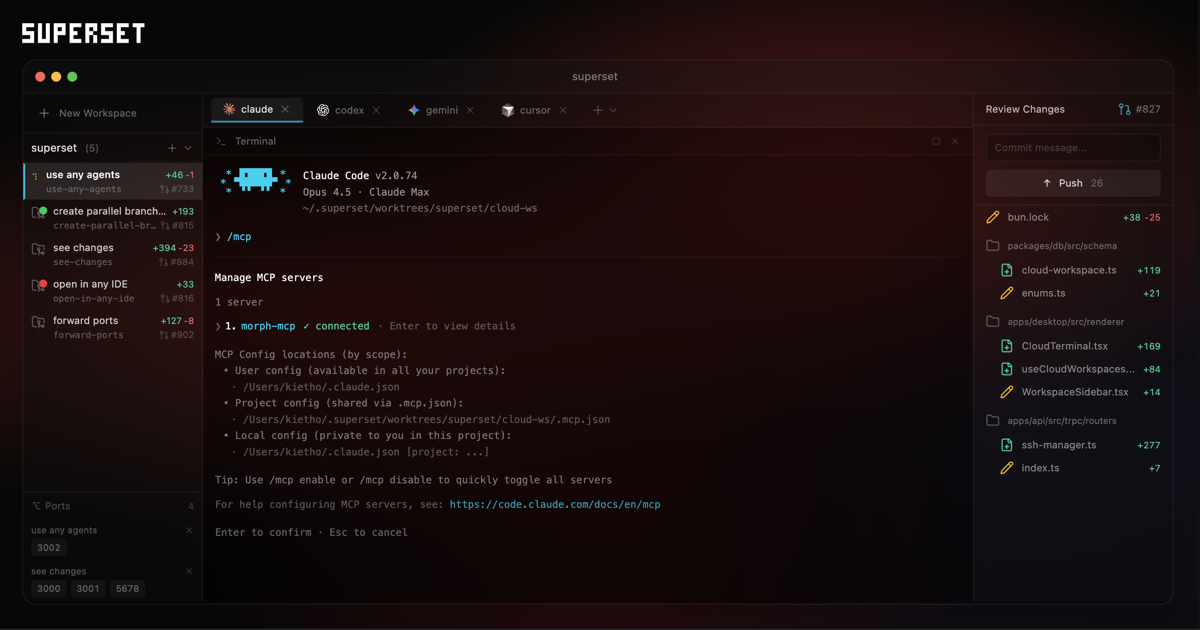
Open-source terminal IDE that runs 10+ parallel AI coding agents using isolated Git worktrees.
What is Superset IDE?
Superset IDE is a turbocharged terminal for the AI agents era, enabling developers to run dozens of AI coding agents simultaneously on a single machine. Launched March 1, 2026, it uses Git worktrees to isolate each agent in its own sandbox—preventing conflicts while enabling true parallel development workflows. Works with any CLI-based coding agent including Claude Code, OpenAI Codex CLI, Cursor Agent, Gemini CLI, GitHub Copilot, and OpenCode. Fully open-source (Apache 2.0), zero telemetry, and no proxied API calls—you use your own keys directly.
Best for: Parallel agent execution · Multi-task development · Open-source preference · Agent-agnostic workflows
Developer Stack Fit
Quick read on where Superset IDE fits in a software team's AI stack. Validate final fit against your codebase, data policy, and deployment model.
- Stack layer
- AI Security
- Deployment model
- Open-source deployable
- Open-source status
- Yes or source-available
- API support
- API or integration-friendly
- MCP support
- No MCP signal found
- Security posture
- Stronger controls worth validating
- Best use case
- Parallel agent execution
Discovery graph
Featured in NeuralStackly paths
Product media
Interface proof
Key Features
- 01
Run 10+ coding agents simultaneously
Run 10+ parallel AI agents
- 02
Git worktree isolation for each task
Git worktree isolation
- 03
Agent-agnostic: Claude Code, Codex, Cursor, Gemini CLI, OpenCode, Copilot
Works with any CLI agent
- 04
Real-time agent monitoring dashboard
A core development capability that teams use daily.
- 05
Built-in diff viewer with syntax highlighting
A core development capability that teams use daily.
- 06
Notifications when agents need attention
A core development capability that teams use daily.
- 07
Open worktrees in any IDE with one click
A core development capability that teams use daily.
- 08
Port forwarding for web servers
A core development capability that teams use daily.
- 09
Workspace presets for automated setup/teardown
A core development capability that teams use daily.
- 10
Fully open-source with zero telemetry
A core development capability that teams use daily.
Pros & Cons
What stands out
- Completely free and open-source
- No vendor lock-in—use any AI provider
- Eliminates sequential execution bottleneck
- Zero telemetry, your keys stay local
- Trusted by teams at DoorDash and Mastra
Watch outs
- Currently macOS only (Windows/Linux untested)
- Human review becomes the bottleneck with many agents
- Requires automation for infrastructure setup
- Best for independent tasks, not tightly coupled work
Pricing Plans
Superset IDE Pricing
Choose the perfect plan for your needs. All plans include our core features with different usage limits and advanced capabilities.
Open Source
Need a Custom Solution?
Looking for enterprise features or custom pricing? Contact Superset IDE directly for tailored solutions.
Contact SalesMost teams land on the Open Source plan.
Alternatives
FAQ
What is Superset IDE and how does it work?
Superset IDE is a development tool that open-source terminal ide that runs 10+ parallel ai coding agents using isolated git worktrees.. It uses AI to help users improve productivity through analyzing input and generating relevant output.
Is Superset IDE free to use?
Superset IDE offers a completely free plan. You can get started without paying anything.
Is there a free plan or trial?
Superset IDE doesn't offer a traditional free trial, but provides a money-back guarantee on paid plans.
What can Superset IDE do?
More development Tools

Cursor
AI-powered code editor with autonomous agents, multi-model support, and Automations for triggering agents via code changes, Slack, or timers.

Ollama
Local-first LLM runtime for running models on your hardware with local privacy, no per-token API costs, and offline-capable workflows.

OpenClaw
Viral open-source personal AI agent with 368K+ GitHub stars, a local-first gateway, tool calling, skills, and multi-channel messaging.
Affiliate Disclosure: We may earn a commission when you purchase through links on our site. This doesn't affect our editorial independence or the price you pay.

Superset IDE
Free